
Explore the part.
Prepare the work.
Start with a part. See the machining features inside it. Try the preloaded demo, then explore the tools that connect geometry to quoting and process planning.
Try feature identificationSee the features.
Understand the part.
Explore how Fabrex identifies machining features in a CAD model. Choose a preloaded part, select a feature, and inspect its geometry, dimensions, and recognition evidence.
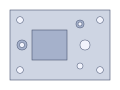
Loading 3D sample…
100 × 70 × 18 mm
Pocket 1
Detected in saved analysis
A recessed floor enclosed by walls. The floor and walls are recognized together.
- Width
- 35 mm
- Length
- 30 mm
- Total depth
- 8 mm
Why this was identified
- Rectangular planar floor bounded by four perpendicular planar walls.
- All four walls extend toward the opening to the same depth.
Preloaded samples · Saved Fabrex tools analysis. Recognition needs engineering review; other features may be present.
Drawing to 3D
Start with an engineering drawing and review the generated model.
Explore drawing conversionCNC quotation
See how features, material, operations, and quantity shape an estimate.
Explore CNC quotingCNC strategy
Review machining directions and setup proposals for a part.
Explore CNC strategiesOne useful tool.
One factory brain.
Engineering is one part of the operation. Meet Rex to explore quotes, batch organization, and the custom workflows that connect sales, production, quality, and delivery.
Meet RexYour workflow.
Meet Rex.
Start with the work that slows your team down. Explore what Rex and custom apps can do for it.