Quote Page Redesign
Release notes
Release notes
v0.5.0 Quote Page Redesign
Added: New modular Quote page replacing the legacy “Classic view”
Added: Multi-file editing within a single quote session
Added: Ability to upload additional files without leaving product edit mode
Added: Consolidated pricing table for multi-line editing
Added: Persistent Quantity and Total summary bar in Overview
Added: Dedicated full-table navigation from Quote items
Added: Visual highlight on “Save” button within editable sections
Added: Improved product/service selection layout (Engineering & 3D Printing structured view)
Added: Background handling improvements for quote-related calculations
Improved: Quote Overview layout and section hierarchy
Improved: Multi-part editing flow (reduced save-and-reenter cycles)
Improved: Pricing flexibility with clearer RRP vs final price comparison
Improved: Order items table total price visibility (always displayed)
Improved: Catalogue client visibility sorting logic
Improved: Minimum price order handling
Improved: Save-on-backdrop click behavior in forms
Improved: Full table horizontal scrolling behavior
Improved: Nester metrics UI/UX presentation
Improved: New version of Nester, accepting an advance configuration
Fix: “Sync unit price” button overlap with price field
Fix: Missing translation in system messages
Fix: Quote page “Go to checkout” disabled logic when form incomplete
Fix: Email sending issue in Spanish language
Fix: Block clients from using Fabrex when restricted
Quote Page Redesign:
Overview, Product Editing & Pricing Control
Clearer quote overview. Multi-file product editing. Faster pricing adjustments. Stronger performance core.
The Quote page has been fully redesigned to simplify daily operations and reduce friction when working with multiple parts. The new experience replaces the previous “Classic view” with a clearer structure, better editing flows, and improved performance across large quotes.
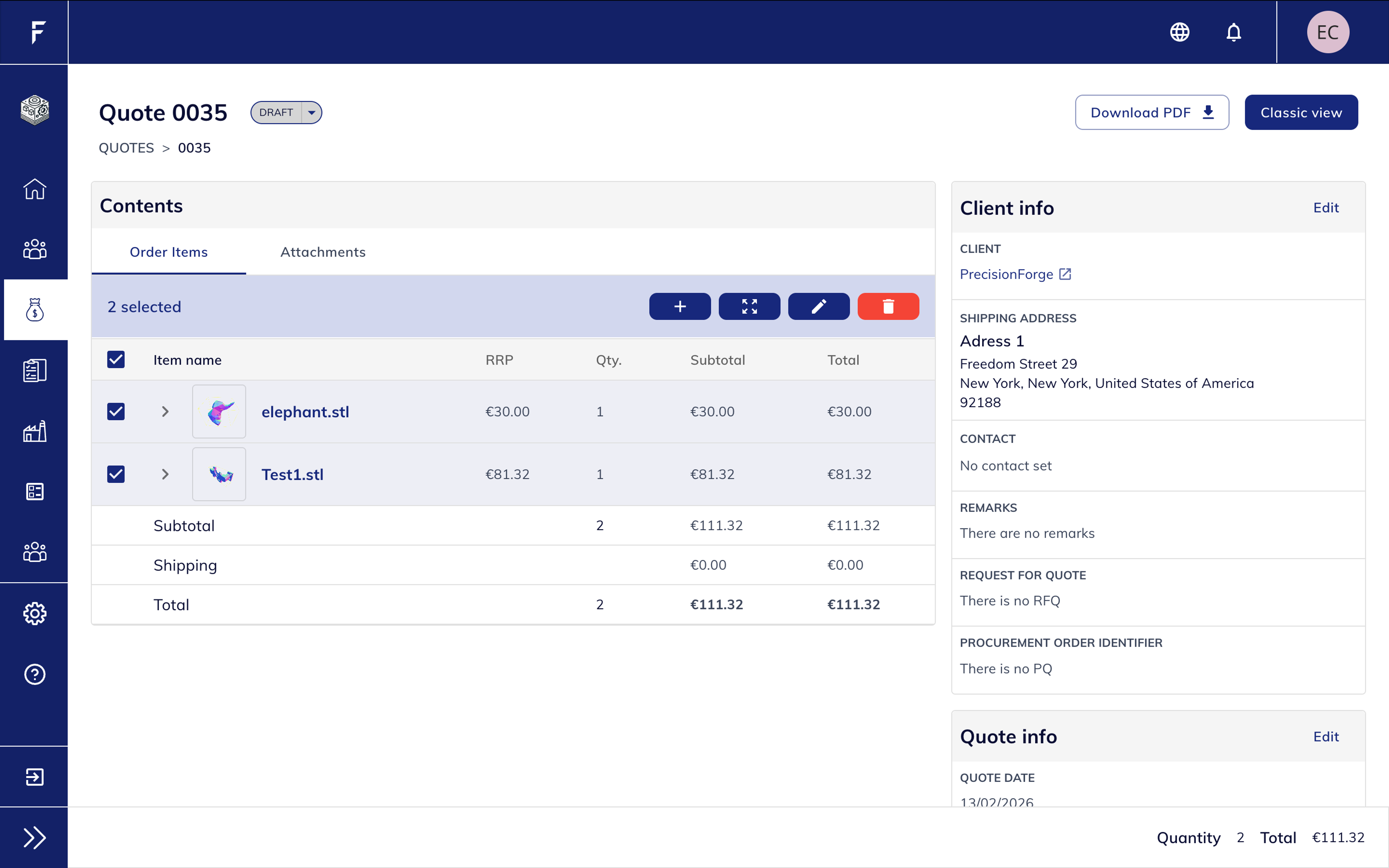
Quote Overview
Clearer structure. Better visibility. Faster actions.
The Quote Overview page has been reorganised to make information easier to read and actions easier to access.
- Cleaner separation between Client Info, Quote Status, Dates and Items
- Quantity and Total always visible in the summary bar
- Primary actions (Edit quote, Download PDF, Status changes) more accessible
- Improved layout for quotes containing multiple parts
- “Classic view” still available for reference
This makes it easier to understand the full state of a quote at a glance and act on it immediately.
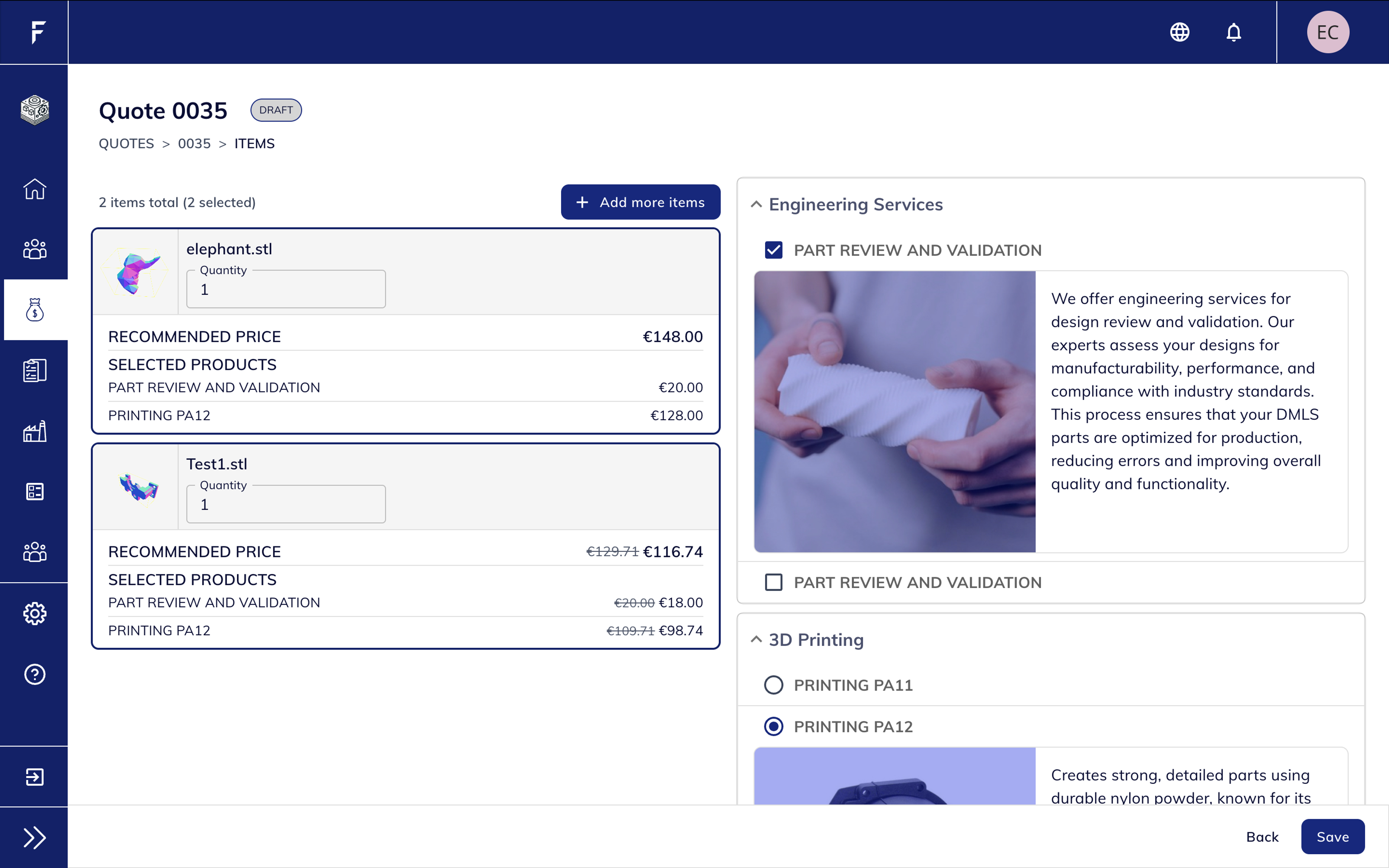
Edit Products
Work on multiple parts at once — without leaving the page.
The product editing experience has been significantly improved to support multi-part quotes and iterative adjustments.
- Edit multiple files within the same screen
- Modify several parts at the same time
- Add new files without saving and exiting the quote
- Structured service selection (Engineering, 3D Printing, etc.)
- Clear visibility of recommended price and selected products per file
Before, editing was done file by file, often requiring saving and re-entering the quote to upload additional files.
Now, the flow is continuous and designed for efficiency — especially for quotes with several STL files.
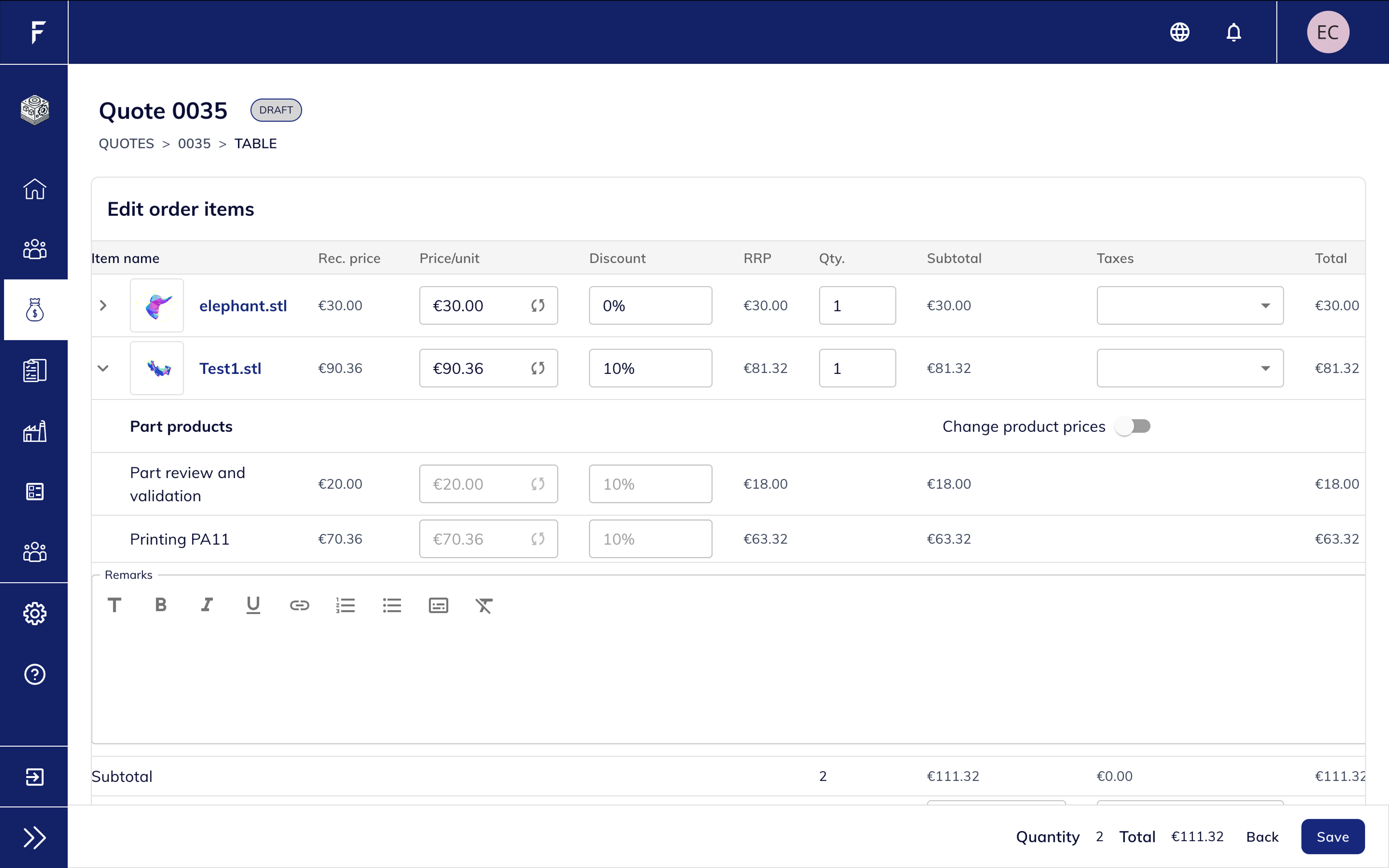
Edit Prices
Full pricing control in a single table view.
Pricing adjustments are now clearer and more flexible, particularly for quotes with multiple parts.
- Edit multiple line items in one consolidated table
- Directly modify unit price, discount and quantity
- Toggle product price adjustments when needed
- Clear comparison between recommended price, RRP and final price
- Better visibility of subtotals and totals across all items
This allows faster negotiation adjustments and simplifies bulk price updates.

Performance
Faster load times. Smoother editing.

Consistency
Better alignment across all quote sections.

Stability
Smarter calculation handling.

Scalability
Built for growth and future features.